Building Good Engagement Feeds
(PLAN REQUIRED: PROFESSIONAL OR POWER USER)
Many of our users are "LinkedIn experts": in other words, "creator/seller hybrids" who already have a commenting strategy and engagement routine. They're using Aware to implement their current commenting workflow to save them 40-70 minutes a day on what they're already doing with bookmarks folders and spreadsheets.
But many Aware users come to us without a commenting strategy already.
If that's you: you're reading the right article! We'd like to show you how to build an engagement strategy and implement it in 15 minutes per day or less, using Aware.
First, what's the purpose of commenting?
You might be wondering: what exactly is the point of commenting? You know people recommend it, and growing creators DO spend time on engagement. But that's not a lot of good to you if you don't know WHY they're recommending it.
(By the way, we use "engagement" and "commenting" interchangeably!)
Here's how commenting helps you grow on LinkedIn:
NEW PROSPECT REACH. It helps you reach new people in a helpful and non-invasive way (vs cold direct messages, which can be invasive sometimes)
ALGORITHM BENEFITS. The LinkedIn algorithm rewards people who do more commenting, both in responses on their own posts, and outbound commenting to others' posts. This is referred to as a "karma system" in social media algo lingo. It's similar on Reddit.
HELPS YOUR OWN POSTS. If you write a lot of comments - say, 10-15 - right before you publish your own posts, your posts will usually get more engagement than otherwise.
COMMUNITY BUILDING. Commenting is an easy way for others to get to know you in a small way. And, you're helping others get more engagement and visibility when you comment in a genuine way on their content, so you're adding to the ecosystem.
LESS CREATIVITY NEEDED VS POSTING. It's a low-effort way to write what we call "micro posts". You don't have to be nearly as original to write a comment than to write a full post.
LOWER EFFORT VS POSTING. It takes a lot less time to write 5 comments per day (we dare you to do this in under 60 seconds per day... it's possible!) than to write one full length post per week.
Beyond that, we could go into a lot more detail (and we do, in this course and elsewhere). But the point is: commenting is a healthy part of your LinkedIn growth strategy. You pretty much have to do it, if you want to grow.
How to Build Good Custom Feeds
One of the most common things our users ask of us is for tips on how to make the best use of the "Custom Feeds" feature. It's one of the most useful features we offer, and there are a lot of ways to take advantage of it. Go to "Custom Lists", and click "Add/Edit".
Two Main Ways of Building Custom Feeds
By specifying people (Best Way!). This is more or less self-explanatory: you upload a list, either in bulk or one by one, of people whose posts you want to see in a dedicated feed within Aware. For example, see my list below of B2B agency owners:
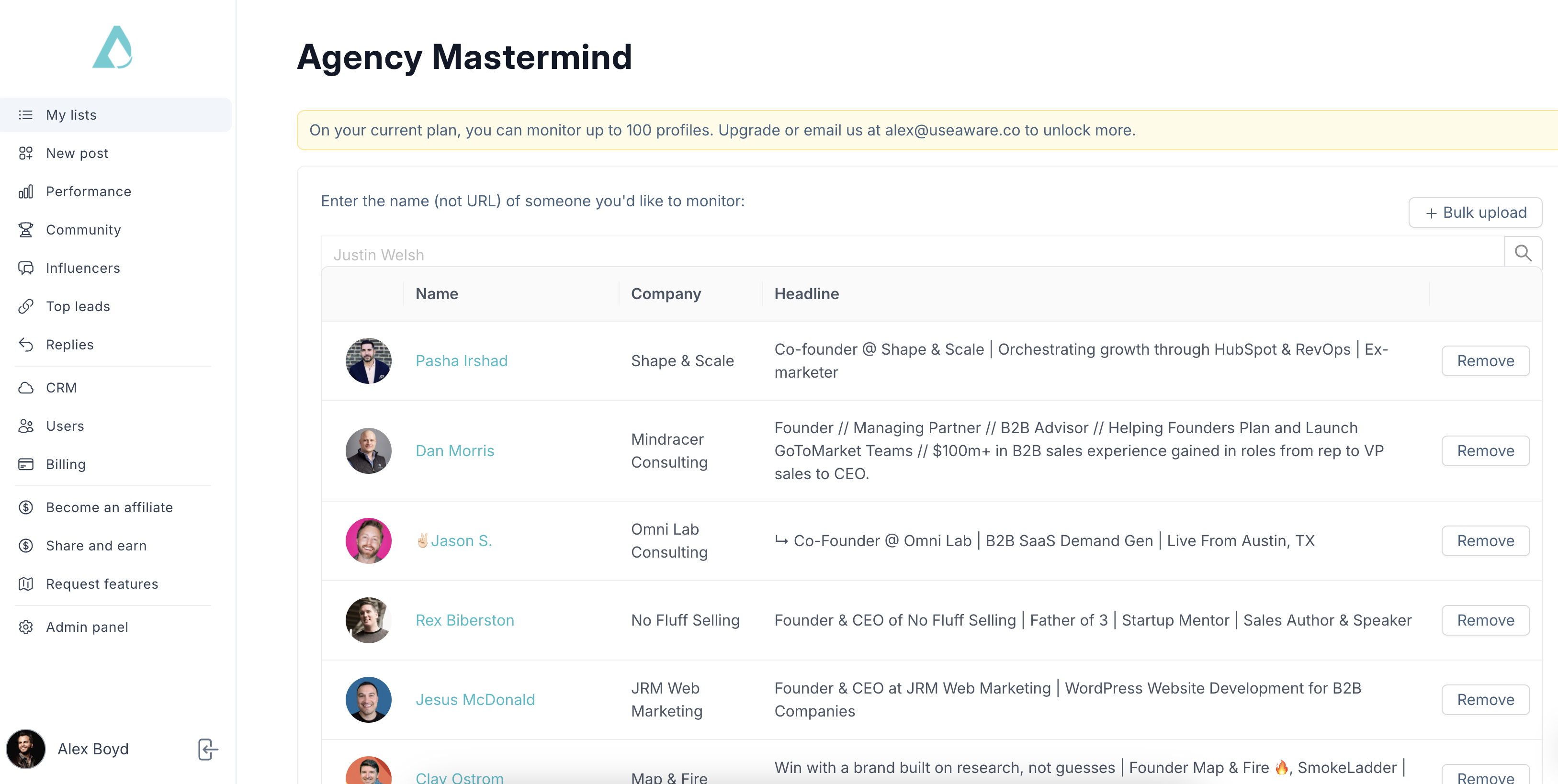
See that "Bulk upload" button in the top right? If I need to add a lot of folks at once, I upload a list that way.Note: we don't currently support direct imports or integrations with Sales Navigator. Sorry! Follow our product roadmap here: https://aware.canny.io/feature-requests
Limitations: Seeing that banner that says you can't monitor more than 200 profiles (or 400 on the Power User plan)? We find that most people are not commenting on enough posts per day to require more than several hundred people added to their Custom Feeds. However, if you have a specific need in mind here, we're happy to discuss a custom plan for you that includes more than 400 profiles added across all of your custom lists. Just let us know if so. Keep in mind that Aware will automatically remove people that you add to custom feeds, if they have not published any content (other than 'straight reposts' with no original content) in over 10 weeks.
By entering keywords (Less Reliable). What does this mean? We leverage LinkedIn's post search capability to find and show you posts that match certain keywords. There are two fields we look for, when we try to find keywords:
The post author's Job Titles and/or Headline
Keywords used in the post content itself
Here you can see where we allow you to specify those keywords:
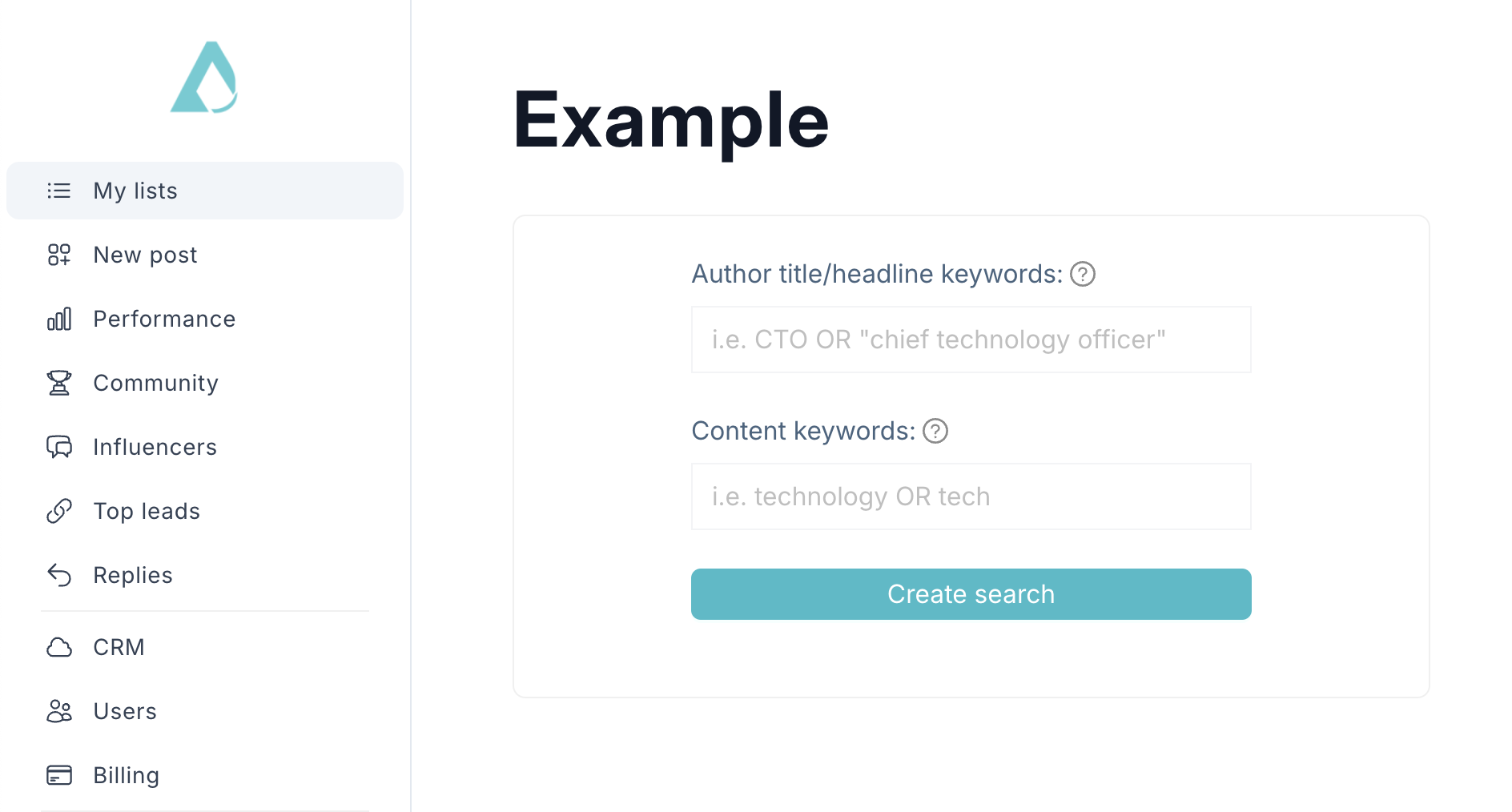
Note: This uses boolean search! But, LinkedIn limits searches to a maximum of 80 characters and up to 1 boolean operator (e.g. AND, OR, NOT, etc). Why? We have no idea. But them's the rules. Sorry!
Strategies for Using Custom Feeds by Listing Specific Profiles
Uploading a list of strategically-important prospects, partners, industry contacts, customers, or investors, to a Specific Person feed
Exporting the LinkedIn profiles of your current target prospect list from Apollo or ZoomInfo, and bulk uploading those to a Specific Person feed to complement your direct outreach strategy
Using a keyword feed where Content Keywords = #yourhashtag to find posts containing a certain hashtag that is relevant to you
Using a keyword feed where Author Title/Headline Keywords = "VP of [Department]" or "CXO", or whatever your typical target decision maker or partner's title might be.
Note: we use LinkedIn's search capabilities, which are, admittedly, intermittent at best. Often times, you can design a search perfectly and it won't work. For example, we're currently seeing that LinkedIn's "top match" and "latest" search results for a very common keyword, like "demand generation", will only show posts that are several months old. Hardly helpful. But, we are tied to what LinkedIn itself offers. We apologize for any inconvenience and are closely following LinkedIn's developments on this front to improve this capability for our users.
It Doesn't Need To Be Perfect
Remember: this is social media, not science. It will never be, and does not need to be, perfect. Is a keyword search not working, both in Aware and on LinkedIn directly? Darn. Head into Apollo and export a specific person feeds, for now. Or just stick to Curated Feeds and Most Engaged for that day.
We are constantly improving how we ingest, sort, filter, and surface good quality data for you, but at the end of the day, we're at the mercy of what LinkedIn provides. So, we do our best!
As always, let us know if you need more help beyond this, and we're so happy to troubleshoot or help you build up something more.